Guides · 8 min read
Buying used servers: what really matters
Generation, form factor, CPU, memory, controller, remote management and warranty: the points that decide whether a used server fits your workload.
Stock items leave our warehouse in Germany within 24 hours
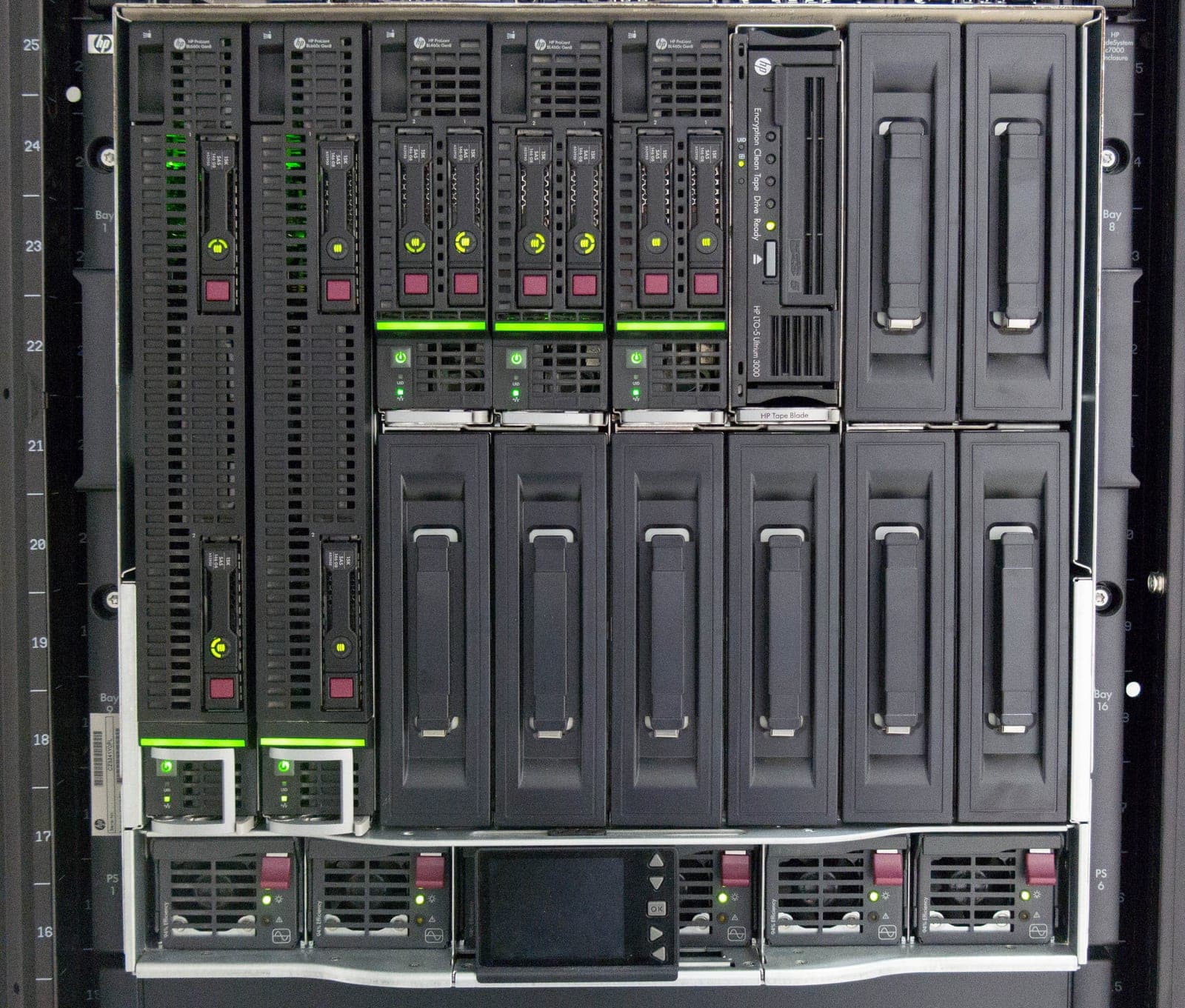
Blade servers are compact server modules without their own power supplies, fans or network switches: that infrastructure is provided by the enclosure, which for HPE is the BladeSystem c7000 with 16 half-height bays in 10 rack units. Networking runs through interconnect modules such as Virtual Connect FlexFabric, and the Onboard Administrator handles central management, including access to each blade's iLO. Compared with individual rack servers you save cabling, rack space and power supplies, but a fully populated enclosure needs an adequately fused 230 V supply and matching cooling. Typical uses are virtualization clusters running VMware ESXi or Proxmox VE and VDI environments. We supply HPE ProLiant BL460c Gen9 and Gen10 blades with your choice of CPUs, RAM and SSDs – tested, cleaned, updated to current firmware and covered by a 12 to 36 month warranty. For larger quantities, we are happy to prepare a project quote.
No products found
Adjust the filters or ask us directly. We can source most hardware within a few days.
A blade server is a server module without its own power supplies or fans; it only runs inside an enclosure. At HPE, that pairing is the BladeSystem c7000 and the ProLiant BL460c blades, which we stock as Gen9 and Gen10. Below you'll find when blades beat rack servers, how the two generations differ and what power and noise mean for where you install them.
c7000 with BL460c
Best for: Ideal for virtualisation clusters and VDI with shared storage.
e.g. Dell R640, HPE DL360 Gen10
Best for: Ideal for individual hosts and local drives.
As a rule of thumb, an enclosure pays off if you fill at least half of it and your data lives on shared storage or a SAN. For two or three hosts, rack servers are simpler.
| Feature | BL460c Gen9 | BL460c Gen10 |
|---|---|---|
| Processors | 2× Xeon E5-2600 v3/v4 (LGA2011-3) | 2× 1st/2nd gen Xeon Scalable (LGA3647) |
| Memory | 16 DIMMs, DDR4 up to 2400 MT/s, max. 2 TB | 16 DIMMs, DDR4 up to 2933 MT/s, max. 2 TB, Optane PMem 100 |
| Drives | 2× SFF, Smart Array P244br | 2× SFF, Smart Array P204i-b |
| Networking | FlexibleLOM, e.g. 650FLB with 2× 20 Gb | FlexibleLOM, e.g. 650FLB with 2× 20 Gb |
| Expansion | 2 mezzanine slots | 2 mezzanine slots |
| Remote management | iLO 4 | iLO 5 |
For new clusters, the BL460c Gen10 is the better choice: more memory bandwidth, iLO 5 and more headroom with current hypervisor releases. The BL460c Gen9 suits extending existing Gen9 estates or serves as an affordable lab node. Upgrade CPUs are under server processors.
The c7000 enclosure takes up 10U and is just over 81 cm deep, so plan for a cabinet at least 1,000 mm deep – see our 19-inch rack guide. Without blades it weighs around 80 kg as delivered, and up to about 218 kg fully populated. Mount it low in the rack, check the cabinet's load rating and take out power supplies, fans and modules before lifting it in.
It comes with six 2650 W power supplies, ten fans and two Onboard Administrators with KVM. The eight interconnect bays are empty, so you choose modules to match your network.
Power draw depends almost entirely on how many blades you fit and how they're specified. With N+N redundancy – two separate feeds – six 2650 W supplies give you at most about 7.9 kW. Total load must stay below that if you want to survive the loss of one feed. In the Onboard Administrator you set the redundancy mode and power cap, and can see the draw of every bay.
For several blades, we'll gladly prepare a project quote. We buy back retired blades and enclosures through our buy-back service.
Yes. A BL460c cannot run on its own, because power, cooling, networking and management are provided by the enclosure. The blades fit the HPE BladeSystem c7000 (16 half-height bays, 10U) and the c3000 (8 bays, 6U). We stock the c7000 and can source matching interconnect modules on request.
For Ethernet, iSCSI and FCoE, Virtual Connect FlexFabric-20/40 F8 is the usual choice; with it, the 650FLB adapters run at 20 Gb per port. Older modules such as Virtual Connect FlexFabric 10Gb/24-port link at 10 Gb, and Ethernet switches or pass-through modules are also available. Each blade's FlexibleLOM adapter connects to interconnect bays 1 and 2, the mezzanine slots to bays 3 to 8.
Yes. BL460c Gen8, Gen9 and Gen10 blades can be mixed in one c7000 as long as the Onboard Administrator and Virtual Connect run current firmware. We ship the enclosure with current OA firmware. Existing Virtual Connect modules should also be updated before you insert Gen10 blades.
The single-phase version has six IEC C20 inlets for 200–240 V. We recommend two separate circuits (A/B feed) via rack PDUs with C19 outlets. A fully populated enclosure can draw several kilowatts, so plan fusing and cooling accordingly.
Guides · 8 min read
Generation, form factor, CPU, memory, controller, remote management and warranty: the points that decide whether a used server fits your workload.