Intel Optane PMem: Memory Mode and App Direct explained
Terabytes of memory for a fraction of the DRAM cost: how Optane PMem works, which servers support it and where the traps are.
- Published
- Reading time
- 8 min
- Topic
- Memory & storage
Contents11 sections
- What is Intel Optane PMem?
- Generations and compatible CPUs
- Optane Memory Mode: lots of RAM, but volatile
- App Direct: persistent memory for applications
- Per-socket memory limit: the M and L trap
- Populating PMem correctly
- Setting up with BIOS, ipmctl and ndctl
- Use cases for persistent memory
- Why used Optane modules are cheap
- Which servers fit?
- Frequently asked questions
Key points
- Intel Optane PMem goes into a DIMM slot and offers 128, 256 or 512 GB per module.
- PMem 100 only works with 2nd-gen Xeon Scalable (Platinum 82xx, Gold 62xx/52xx, Silver 4215); PMem 200 only with 3rd gen.
- Memory Mode turns PMem into large, volatile system memory with no software changes. App Direct uses it as persistent, byte-addressable storage.
- PMem counts towards the CPU's memory limit. On Cascade Lake, more than 1 TB per socket needs an M or L CPU.
Intel Optane is a memory technology between DRAM and flash. In servers you'll mostly meet it as Optane PMem (persistent memory): DDR4-format modules installed next to the system memory, giving you several terabytes of main memory per server for a fraction of the DRAM cost. This guide covers Memory Mode, App Direct, platform requirements and population pitfalls.
What is Intel Optane PMem?
PMem uses 3D XPoint media instead of DRAM cells. It keeps data without power yet is byte-addressable like RAM: the CPU reads and writes cache lines, not whole blocks as with an SSD. Latency, at a few hundred nanoseconds, is higher than DRAM but far below an NVMe SSD. Every module has its own controller that handles wear levelling and encrypts the data.
Three sizes exist: 128, 256 and 512 GB. Typical DDR4 RDIMMs hold 32 or 64 GB; 128 GB per slot otherwise means expensive LRDIMMs. See our Intel Optane PMem category.
Generations and compatible CPUs
| Generation | Platform | Memory | Example servers |
|---|---|---|---|
| PMem 100 | Xeon Scalable gen 2 (Cascade Lake): Platinum 82xx, Gold 62xx/52xx, Silver 4215 | DDR4, up to 2666 MT/s | Dell R640/R740, HPE DL360/DL380 Gen10, Lenovo SR630/SR650 |
| PMem 200 | Xeon Scalable gen 3 (Ice Lake-SP) | DDR4, up to 3200 MT/s | Dell R650/R750, HPE DL360/DL380 Gen10 Plus |
| PMem 300 | Xeon Scalable gen 4 (Sapphire Rapids) | DDR5 | still rare on the used market |
The most common PMem 100 trap is the CPU. Only Platinum 82xx, Gold 62xx and 52xx and, as the only Silver, the 4215 are supported. A Silver 4214, the Bronze parts and all of gen 1 (Gold 61xx, Silver 41xx) are out. A Xeon Gold 6248 is a typical choice. Once PMem 100 is installed, the memory channels run at 2666 MT/s, even if CPU and DRAM could do 2933.
Optane Memory Mode: lots of RAM, but volatile
In Memory Mode the operating system only sees the PMem capacity as system memory. The DRAM disappears from view and acts as a cache in front of it, run by the CPU's memory controller. Hypervisor and OS simply see more RAM. Still, check that your version is supported for Memory Mode.
Data in this mode is not persistent – after power-off it's gone, just like DRAM. A rule of thumb for the DRAM-to-PMem ratio is 1:4 to 1:8. Example per CPU: 6 × 32 GB DRAM (192 GB) in front of 6 × 128 GB PMem (768 GB) gives 1:4. The system reports 768 GB per socket, or 1.5 TB with two CPUs.
This works well as long as the actively used data fits in the DRAM cache – lots of VMs or VDI desktops that rarely touch most of their memory, for instance. If an application keeps hitting the whole memory at random, performance drops noticeably.
App Direct: persistent memory for applications
In App Direct mode the DRAM stays normal system memory and PMem appears as a separate persistent region. Data survives a reboot. On Linux you create namespaces on it in one of three modes:
- fsdax: a file system such as ext4 or XFS mounted with the dax option. Applications that mmap files access PMem directly, bypassing the page cache.
- devdax: a character device without a file system that applications or VMs map in full.
- sector: a block device with atomic sector writes. It behaves like an extremely fast SSD and needs no software changes.
App Direct only pays off fully with software that knows about PMem, such as SAP HANA, some databases or programs built on the PMDK library. Windows Server and VMware ESXi can use PMem too. In mixed mode you split the capacity, for example 50 % Memory Mode and 50 % App Direct.
Memory Mode
PMem as large system memory
- no software changes needed
- several TB of RAM per server at low cost
- not persistent
- DRAM capacity becomes invisible
- slower once the active data set outgrows the cache
Best for: Ideal for virtualisation, VDI and large in-memory caches.
App Direct
PMem as persistent memory
- data survives reboots
- byte-addressable, far lower latency than NVMe
- fast restarts of large databases
- software must support PMem
- more effort to set up namespaces
- no extra system memory
Best for: Ideal for SAP HANA, PMem-aware databases and fast logs.
Per-socket memory limit: the M and L trap
On 2nd-gen Xeon Scalable, Intel limits the memory per CPU depending on the model – and the limit covers DRAM and PMem combined. Standard models such as the Xeon Platinum 8280 handle 1 TB per socket, the M variant (8280M) 2 TB and the L variant (8280L) 4.5 TB.
Ice Lake-SP (gen 3) dropped these tiers; every CPU there supports considerably more memory per socket.
Populating PMem correctly
Each channel takes at most one PMem module, always alongside a DRAM module. 2nd-gen Xeon Scalable has two memory controllers per CPU with three channels each. The usual full layout is called 2-2-2: each channel holds two modules, one of them PMem. That's 6 DRAM plus 6 PMem per CPU – with two CPUs, all 24 slots of a Dell R740 or HPE DL380 Gen10.
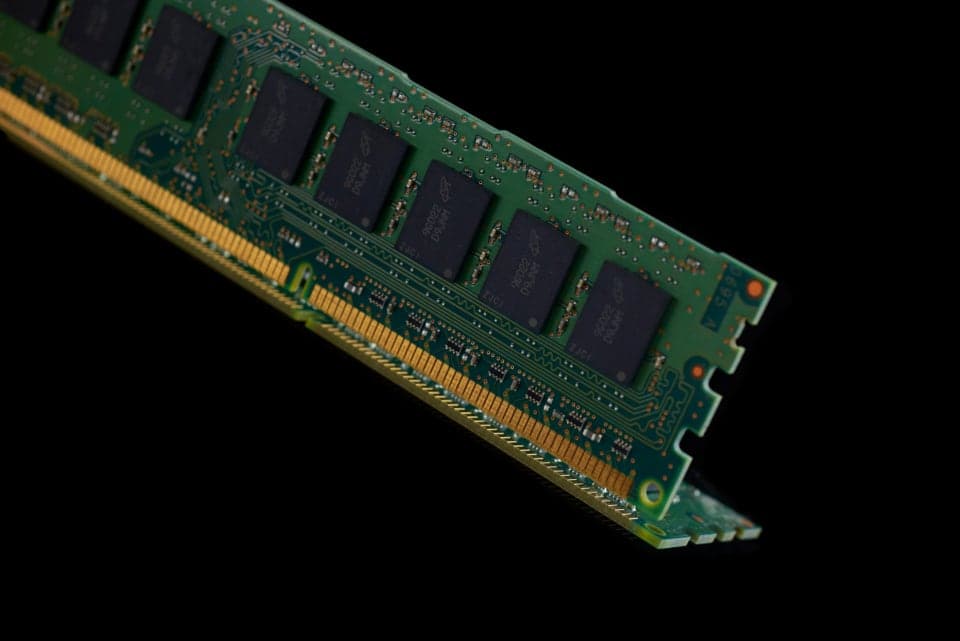
Smaller layouts with fewer PMem modules, such as 2-1-1, are possible but deliver less bandwidth. All PMem modules in a server should be the same size, as should the DRAM. The vendor defines which slot per channel takes the PMem. For DRAM basics, see our guide to ECC RAM, RDIMM and LRDIMM.
Setting up with BIOS, ipmctl and ndctl
You set the mode in the BIOS setup or, on Linux and Windows, with ipmctl:
- Check the modules: ipmctl show -dimm lists every PMem module with capacity, health and firmware version.
- Set a goal: ipmctl create -goal MemoryMode=100 for pure Memory Mode, PersistentMemoryType=AppDirect for App Direct, or for example MemoryMode=50 for mixed mode.
- Reboot: the BIOS only applies the configuration on the next start.
- For App Direct, create namespaces: ndctl create-namespace --mode=fsdax, for example, creates /dev/pmem0, which you format and mount with the dax option.
ipmctl show -sensor reports remaining life and temperature. Keep BIOS and PMem firmware at a level approved by the server vendor.
Use cases for persistent memory
- Large VMs and VDI: in Memory Mode a dual-socket server holds 1.5 TB or more – ideal for many VMs with little actively used memory.
- SAP HANA: HANA can keep its column tables on PMem via App Direct. After a restart the data is there at once instead of loading from SSD for minutes. Production systems must follow SAP's hardware certification.
- Redis and caches: large in-memory caches fit into a single server in Memory Mode without changes.
- Databases: PMem-aware databases use App Direct for logs or buffers and cut write latency.
Why used Optane modules are cheap
In 2022 Intel announced that it would wind down its Optane business. No new generations are coming, while data centres retire many Cascade Lake and Ice Lake servers. So used PMem modules sell for far less than DRAM of the same capacity. Check with your server and software vendors how long firmware updates and support will be offered.
Which servers fit?
PMem 100 runs in the common dual-socket servers with 2nd-gen Xeon Scalable: Dell PowerEdge R640 and R740, HPE ProLiant DL360 Gen10 and DL380 Gen10, and Lenovo ThinkSystem SR630 and SR650. The CPU decides: a first-gen Xeon Scalable server needs new processors, and the BIOS must support PMem.
Matching items from our range
€169.99
incl. 19% VAT, net €142.85
Frequently asked questions
Short answers to the questions we hear most often on this topic.
What is Intel Optane PMem?
A DDR4-format module based on 3D XPoint, with 128, 256 or 512 GB. It goes into a memory slot of a Xeon Scalable server and works as large system memory (Memory Mode) or persistent memory (App Direct).
Which CPUs support Optane PMem 100?
Only 2nd-gen Xeon Scalable, and within that Platinum 82xx, Gold 62xx and 52xx and the Silver 4215. Other Silver and all Bronze models, as well as first-gen parts, cannot use PMem. PMem 200 needs the 3rd generation.
Is data persistent in Memory Mode?
No. In Memory Mode PMem behaves like normal system memory and its contents are lost at power-off. Data is only persistent in App Direct mode.
Can I run Optane PMem without DRAM?
No. Every memory channel with PMem also needs a DRAM module. In Memory Mode it acts as a cache, in App Direct mode as normal system memory.
Is Intel Optane still supported?
Intel announced in 2022 that it would wind down the Optane business. Existing modules keep working; check with your server and software vendors how long firmware updates and support will be available.
What is the difference between Optane PMem and an Optane SSD?
PMem sits in a memory slot and is byte-addressable like RAM. An Optane SSD such as the P4800X is an NVMe drive with very low latency and high write endurance, for example for a ZFS SLOG.
Matching products
From our warehouse in Germany, tested and under warranty.
- Used12 mo. warranty
Samsung, DDR4 ECC RAM
Samsung 8 GB DDR4-2400 ECC RDIMM 1Rx8
Part no.PC4-2400T-RD0-11- 8 GB DDR4-2400 registered ECC
- Samsung 1Rx8, PC4-2400T-RD0-11
In stock
€59.95
incl. 19% VAT, net €50.38
- Used12 mo. warranty
Micron, DDR4 ECC RAM
Micron 8 GB DDR4-2133 ECC RDIMM 2Rx8
Part no.PC4-2133P-RE1-11- 8 GB DDR4-2133 registered ECC
- Micron 2Rx8, PC4-2133P-RE1-11
In stock
€39.95
incl. 19% VAT, net €33.57
- Used12 mo. warranty
Samsung, DDR4 ECC RAM
Samsung 8 GB DDR4-2133 ECC RDIMM 2Rx8
Part no.PC4-2133P-RE0-10- 8 GB DDR4-2133 registered ECC
- Samsung 2Rx8, PC4-2133P-RE0-10
Only 2 left
€39.95
incl. 19% VAT, net €33.57
Keep reading
ECC RAM explained: UDIMM, RDIMM, LRDIMM and channels
Error correction, module types, ranks and memory channels: what to know before you buy or upgrade server memory.
Read more
SAS vs SATA vs NVMe: choosing server SSDs and SAS drives
Interfaces, form factors, endurance classes and backplanes: how to find the right drive for your server.
Read more
RAID 10, RAID 5 or RAID 6? RAID levels compared
From RAID 0 to RAID 60: what each level gives you in capacity, safety and write speed, why large hard drives need RAID 6 and when an HBA is the better fit.
Read more