SAS vs SATA vs NVMe: choosing server SSDs and SAS drives
Interfaces, form factors, endurance classes and backplanes: how to find the right drive for your server.
- Published
- Reading time
- 8 min
- Topic
- Memory & storage

Contents8 sections
Key points
- SATA offers 6 Gb/s over one port, SAS 12 Gb/s full duplex with two ports. NVMe usually connects straight to the CPU over four PCIe lanes.
- A SAS controller also runs SATA drives, but not the other way round.
- Server SSDs come in endurance classes: Read Intensive (~1 DWPD), Mixed Use (~3) and Write Intensive (~10).
- Whether a bay can take NVMe depends on the backplane and cabling, not the drive caddy.
SAS vs SATA vs NVMe is the first question when you choose drives for a server. The interface sets bandwidth, latency and resilience – and which controller and backplane you need. This guide covers the differences, form factors, server SSD endurance and which SAS hard drive or SSD suits which job.
SAS vs SATA vs NVMe: the interfaces
SATA comes from the PC world and runs at 6 Gb/s, about 550 MB/s net. The link is half duplex: the drive sends or receives, never both at once.
SAS (Serial Attached SCSI) is the server version. SAS-3 runs at 12 Gb/s full duplex. Two ports let two controllers or expanders reach the same drive – the basis of redundant paths in storage systems. Error handling is more robust too.
NVMe is a protocol on top of PCI Express, not a cabling standard. The drive usually connects straight to the CPU over four lanes. PCIe 3.0 x4 delivers up to about 3.5 GB/s, PCIe 4.0 x4 about 7 GB/s, and latency drops to a few tens of microseconds.
Queue depth: why NVMe pulls ahead under parallel load
SATA with NCQ has a single queue with 32 entries; SAS drives handle considerably deeper queues. NVMe allows up to 65,535 queues with up to 65,536 commands each; in practice every CPU core gets its own. That's why NVMe scales so well with databases and dense virtualisation.
SAS controllers take SATA – not the other way round
A SAS controller or HBA runs SATA drives without fuss. The reverse doesn't work: on a SAS connector the gap between data and power contacts is closed, so it won't even go into a SATA socket. A SATA drive on a SAS controller uses one port and stays at 6 Gb/s. Don't mix SAS and SATA in one RAID array; many controllers refuse anyway.
SATA
6 Gb/s, single port
- cheap, wide choice
- works on SATA and SAS controllers
- half duplex, one queue of 32 commands
- SSDs capped at around 550 MB/s
Best for: Ideal for boot drives, homelabs and bulk storage.
SAS
12 Gb/s, full duplex, dual port
- robust, good error handling
- two ports for redundant paths
- standard behind hardware RAID
- needs a SAS controller or HBA
- SAS SSDs limited to around 1.1 GB/s per port
Best for: Ideal for classic RAID servers with a hardware controller.
NVMe
PCIe 3.0/4.0 x4
- 3.5 to 7 GB/s per drive
- very low latency, deep queues
- no controller bottleneck
- needs NVMe-capable backplane and lanes
- hardware RAID only with a tri-mode controller
Best for: Ideal for databases, many VMs, Ceph and fast ZFS pools.
Server form factors
| Form factor | Size | Interfaces | Typical use |
|---|---|---|---|
| 2.5-inch (SFF) | approx. 70 mm wide, 7 or 15 mm high | SATA, SAS | SSDs and 10K hard drives in 1U and 2U servers |
| 3.5-inch (LFF) | approx. 102 mm wide, 26 mm high | SATA, SAS | large 7.2K hard drives for storage and backup |
| U.2 / U.3 | 2.5-inch, 7 or 15 mm, SFF-8639 connector | NVMe over PCIe x4, U.3 also SAS/SATA | NVMe SSDs in hot-plug bays |
| M.2 | 22 mm wide, 80 or 110 mm long | SATA or NVMe | boot drives on adapter cards |
| E1.S | slim sled, approx. 32 × 112 mm | NVMe over PCIe x4 | dense NVMe in newer 1U servers |
U.3 drives generally work in U.2 bays; U.2 drives don't always work in U.3-only bays. Boot modules such as Dell's BOSS card or HPE's NS204i hold two mirrored M.2 SSDs for the OS without using a front bay.
SAS hard drives and SATA hard drives: the classes
- 10K SAS (10,000 rpm): 2.5-inch, 600 GB to 2.4 TB, roughly 150 IOPS (rule of thumb). Mostly replaced by SSDs, but cheap for existing systems, such as the Dell 2.4 TB 10K SAS.
- 15K SAS (15,000 rpm): 2.5-inch, 900 GB at most, around 200 IOPS. Hardly worth it now – any SATA SSD is faster.
- 7.2K NL-SAS and SATA (7,200 rpm): 3.5-inch, 4 to over 20 TB, around 80 IOPS and 200 to 270 MB/s sequential. NL-SAS (nearline) pairs capacity-drive mechanics with the dual-port SAS interface.
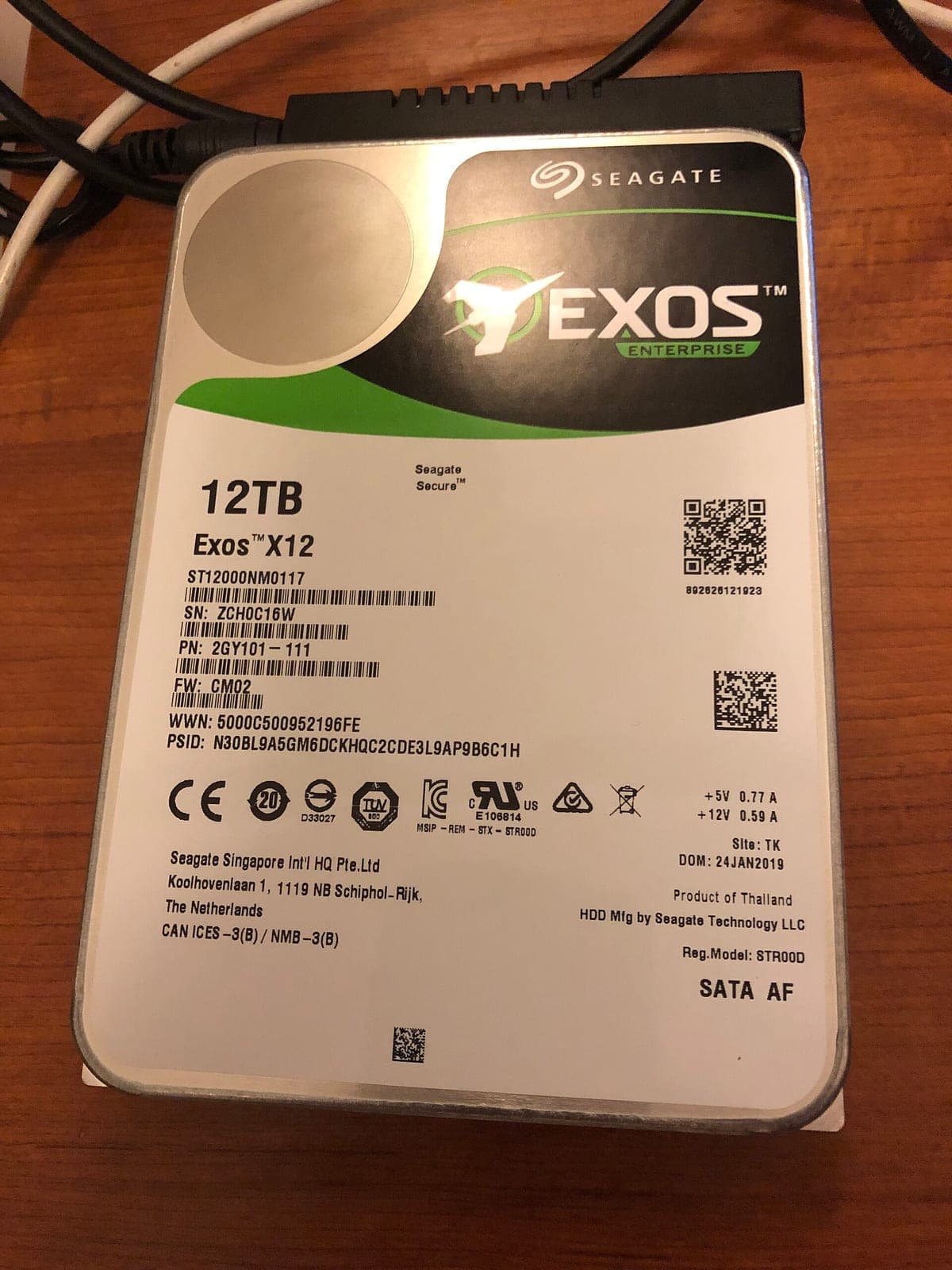
For backup and archive, 3.5-inch NL-SAS drives such as the Seagate Exos X12 with 12 TB are the first choice. All models: SAS hard drives. Avoid SMR drives for RAID and ZFS; their performance collapses during rebuilds.
Server SSDs: endurance in DWPD and TBW
Flash wears with every write, so endurance is rated in two ways. TBW (terabytes written) is the total data that may be written over the warranty period. DWPD (drive writes per day) says how often the full capacity may be written each day, usually over five years. The formula: TBW = DWPD × capacity × 365 × years.
| Class | DWPD | TBW at 1.92 TB over 5 years | Typical use |
|---|---|---|---|
| Read Intensive (RI) | ~1 | approx. 3,500 TB | file and web servers, boot, most VM datastores |
| Mixed Use (MU) | ~3 | approx. 10,500 TB | databases and VMs with heavy writes |
| Write Intensive (WI) | ~10 | approx. 35,000 TB | logs, caches, ZFS SLOG, Ceph WAL |
Also look for power loss protection: capacitors on the board flush the cache safely if power fails. Enterprise server SSDs such as the Samsung PM893 have it; most consumer SSDs don't. For databases, ZFS and Ceph it's a must.
NVMe in servers: backplanes, lanes and tri-mode
Drive bays sit on a backplane cabled to the controller. One SFF-8643 cable (Mini-SAS HD) carries four SAS lanes, so an 8-bay backplane needs two cables to an 8i controller such as the LSI 9300-8i. Backplanes with 12 or 24 bays usually have a SAS expander that shares out the lanes.
NVMe bays work differently: every drive needs its own four PCIe lanes. A dual-socket server with 2nd-gen Xeon Scalable has 96 lanes in total – 24 NVMe drives alone would need 96. So usually only some bays are NVMe-capable, cabled to the motherboard or fed by PCIe switch cards. AMD EPYC has more headroom, with 128 lanes from a single CPU – as in the HPE DL385 Gen10 Plus.
A third option is tri-mode controllers such as the Broadcom HBA 9400-8i or newer RAID controllers: they speak SAS, SATA and NVMe over the same connectors. That saves lanes, and tri-mode RAID controllers even allow hardware RAID for NVMe, but the controller caps total bandwidth.
Drive caddies
Hot-plug drives sit in vendor-specific caddies. Dell shares one caddy across 14G and 15G, with a different one for 13G. HPE used the SmartCarrier from Gen8 to Gen10 Plus, and Lenovo ThinkSystem has its own trays. Without the right caddy a drive won't slide in; empty bays need blanks for proper airflow. Adapters fit 2.5-inch SSDs into 3.5-inch bays. Drives such as the Dell 1.92 TB SAS SSD already come in the matching 14G caddy.
Which drive for which job?
- Boot: two small SSDs in RAID 1, such as 240 to 480 GB SATA, or M.2 on a boot module. Read Intensive is plenty.
- Virtualisation: SAS or SATA SSDs in RAID 10 for small hosts, U.2 NVMe such as the Samsung PM9A3 for many VMs.
- Databases: NVMe with power loss protection, Mixed Use for heavy writes.
- Backup and archive: 3.5-inch NL-SAS or SATA at 7,200 rpm in RAID 6, for example in a Dell R740xd with 12 LFF bays.
- ZFS and TrueNAS: drives on an HBA in IT mode, never behind a RAID controller. For the SLOG, a high-endurance SSD with power loss protection, such as an Optane P4800X.
For the matching RAID level, see our guide RAID 1, 5, 6 or 10.
Frequently asked questions
Short answers to the questions we hear most often on this topic.
What is the difference between SAS and SATA?
SAS runs at 12 Gb/s full duplex with two ports for redundant paths; SATA manages 6 Gb/s half duplex over one port. SAS is the standard behind RAID controllers, SATA is cheaper and fine for boot and archive.
Can I connect a SAS hard drive to a SATA port?
No. SAS drives don't physically fit SATA sockets and need a SAS controller or HBA. The other way round works: SATA drives run on SAS controllers.
What is a SAS SSD?
An SSD with a SAS interface, usually 2.5-inch, with 12 Gb/s and two ports. It fits any SAS bay behind a RAID controller – the fast option for servers without NVMe bays.
What does DWPD mean for SSDs?
Drive writes per day: how often the full capacity may be written each day over the warranty period. 1 DWPD on a 1.92 TB SSD over five years equals roughly 3,500 TB written.
Do I need a RAID controller for NVMe in a server?
No. NVMe drives normally connect straight to the CPU, and redundancy is handled by software such as ZFS, mdadm, Storage Spaces or vSAN. Hardware RAID for NVMe requires a tri-mode controller.
Can I use consumer SSDs in a server?
Technically often yes, but it rarely makes sense: consumer SSDs usually lack power loss protection, have lower endurance and slow down under sustained load.
Keep reading
ECC RAM explained: UDIMM, RDIMM, LRDIMM and channels
Error correction, module types, ranks and memory channels: what to know before you buy or upgrade server memory.
Read more
Intel Optane PMem: Memory Mode and App Direct explained
Terabytes of memory for a fraction of the DRAM cost: how Optane PMem works, which servers support it and where the traps are.
Read more
RAID 10, RAID 5 or RAID 6? RAID levels compared
From RAID 0 to RAID 60: what each level gives you in capacity, safety and write speed, why large hard drives need RAID 6 and when an HBA is the better fit.
Read more