10Gb network card: Intel X520-DA2, X710-DA2 or X550-T2?
Which used 10 or 25 GbE card suits your switch and cabling, how SFP+ differs from RJ45 and what to check for drivers, slots and modules.
- Published
- Updated
- Reading time
- 7 min
- Topic
- AI & homelab
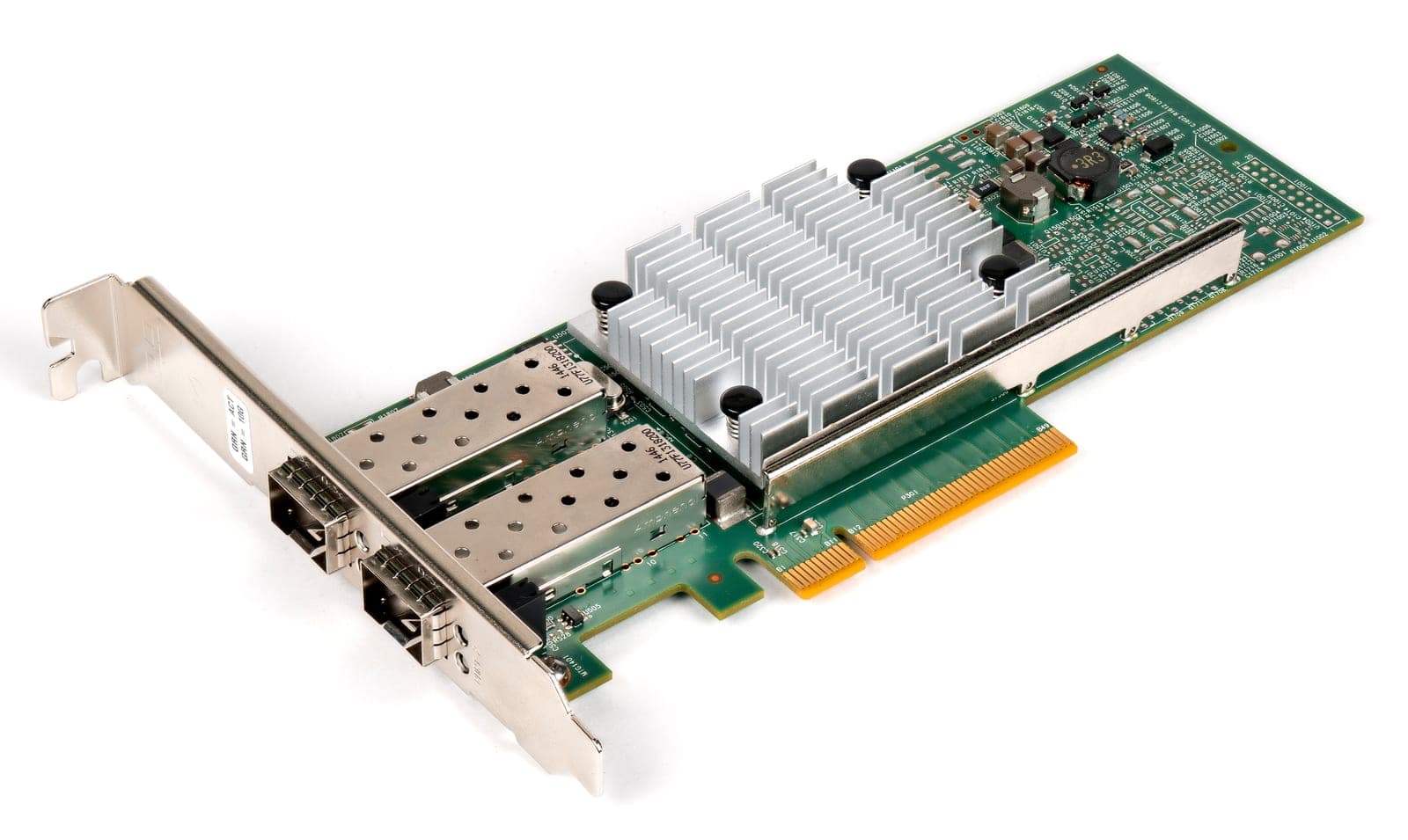
Dmitry Nosachev, CC BY-SA 4.0 · Wikimedia Commons
Contents8 sections
Key points
- SFP+ with a DAC cable is the most frugal and affordable 10G link over short distances. RJ45 (10GBASE-T) makes sense where copper cabling is already in place.
- The Intel X520-DA2 is the affordable classic; the X710-DA2 draws less power and runs on PCIe 3.0.
- The X550-T2 delivers 10G over RJ45 and gets by with four PCIe lanes. The E810-XXVDA2 manages 25 Gbit/s per port.
- For firewalls running OPNsense or pfSense, the Intel I350-T4 with four gigabit ports is a proven choice.
- Intel cards work under Linux, Proxmox, TrueNAS and FreeBSD with drivers that ship with the system.
Gigabit Ethernet quickly becomes the bottleneck in a homelab: copying to the NAS, running a backup or migrating a VM crawls along at just over 110 MB/s, even though the SSDs could do many times that. A 10Gb network card raises the ceiling tenfold. Used Intel server cards are the obvious choice, as they're widely available and recognised by practically every operating system without extra drivers.
SFP+ or RJ45: the first decision
Before choosing a card, settle the connector type. It has to match your switch and the cabling you already have.
SFP+ (X520-DA2, X710-DA2)
cage for modules or DAC cables
- very low power draw with a DAC cable
- little heat, low latency
- long distances with fibre
- modules or cables cost extra
- module coding must suit the card
Best for: Ideal for server and switch in the same rack or room.
RJ45 / 10GBASE-T (X550-T2)
standard network socket
- works with existing Cat6a cabling
- no modules needed
- also runs at 1 Gbit/s on older switches
- more power and heat per port
- 10GBASE-T switches usually cost more
Best for: Ideal where copper cabling already runs through the house or office.
For 10GBASE-T, Cat6a cable covers the full 100 m; Cat6 manages shorter runs. A passive DAC cable (direct attach copper) spans a few metres and is the simplest option within a rack. For longer runs between rooms, use optical modules with fibre.
The cards compared
| Card | Ports | Controller | PCIe | Linux driver | Use |
|---|---|---|---|---|---|
| Intel X520-DA2 | 2× SFP+ 10G | 82599 | 2.0 x8 | ixgbe | affordable entry, firewall, NAS |
| Intel X710-DA2 | 2× SFP+ 10G | X710 | 3.0 x8 | i40e | lower power, more modern features |
| Intel X550-T2 | 2× RJ45 10G | X550 | 3.0 x4 | ixgbe | existing copper cabling |
| Intel E810-XXVDA2 | 2× SFP28 25G | E810 | 4.0 x8 | ice | clusters, Ceph, fast storage |
| Intel I350-T4 | 4× RJ45 1G | I350 | 2.1 x4 | igb | firewall, router, network segmentation |
The models in detail
Intel X520-DA2: the classic
The X520-DA2 with the 82599 controller has been the standard 10G card in homelabs for years. It's affordable, robust and supported everywhere. The downsides are higher power draw than newer cards and its PCIe 2.0 interface: in an x8 slot there's enough bandwidth for both ports, in an x4 slot not quite.
Intel X710-DA2: more frugal and modern
The X710-DA2 uses PCIe 3.0, draws less power and runs cooler. It supports SR-IOV and modern offload features. For a server that runs around the clock, it's usually the better choice over the X520. Keep firmware and drivers up to date, as Intel has released several updates for this series.
Intel X550-T2: 10G over RJ45
The X550-T2 delivers 10 Gbit/s over ordinary network cables and also works with gigabit switches. In hardware it also supports 2.5 and 5 Gbit/s; whether those intermediate speeds are usable depends on firmware, driver and operating system. With PCIe 3.0 x4 it fits slots that are too small for x8 cards.
Intel E810-XXVDA2: 25 GbE
The E810-XXVDA2 offers two SFP28 ports at 25 Gbit/s and also takes SFP+ modules for 10 Gbit/s. It supports RDMA and is aimed at Ceph clusters and fast storage. Under Linux, the ice driver loads an add-on package (DDP) from the firmware directory; without it, the card runs with reduced functionality. Use an up-to-date system.
Intel I350-T4 and Mellanox
The Intel I350-T4 has four gigabit ports and is popular for firewalls running OPNsense or pfSense: WAN, LAN, guest network and DMZ each get a port of their own. FreeBSD has supported Intel cards reliably for a long time. Used Mellanox ConnectX-3 and ConnectX-4 Lx cards are an alternative under Linux, although the ConnectX-3 is an old generation for which not every operating system still ships drivers.
Drivers: Proxmox, TrueNAS and OPNsense
All the Intel cards listed are recognised by the drivers in the Linux kernel, so Proxmox VE and TrueNAS SCALE pick them up too. TrueNAS CORE, OPNsense and pfSense are based on FreeBSD and also include suitable drivers. As a rule, nothing extra needs installing. Use lspci to check the card has been detected and ethtool to see the negotiated speed.
If you're building a NAS with TrueNAS and ZFS, you'll usually need a suitable disk controller as well as the network card. Our guide to HBAs in IT mode for TrueNAS and ZFS explains what matters.
How to set up network bridges and VLANs for VMs under Proxmox is covered in Proxmox instead of VMware. Suitable hardware for getting started is described in our guide to the homelab server.
Check the slot and PCIe lanes
Server network cards need a suitable slot. An x8 card physically fits an x8 or x16 slot. Many desktop motherboards, however, wire their second x16 slot with only four lanes. That's plenty for the X550-T2 and the I350-T4, but the PCIe 2.0 X520-DA2 can't then run both ports flat out at the same time. The E810 also works in PCIe 3.0 x8 slots and still reaches full speed on both 25G ports there.
SR-IOV: one card, many virtual ports
With SR-IOV, a network card splits itself into several virtual functions, each of which you can assign directly to a VM. The VM then talks to the hardware without going through the host's software bridge, which saves CPU load and cuts latency. SR-IOV and IOMMU (VT-d or AMD-Vi) must be enabled in the BIOS. For most homelabs a normal Linux bridge is enough; SR-IOV pays off at high throughput or for virtual firewalls.
Spotting counterfeit cards
Counterfeits of the X520, X540 and I350 in particular are sold as originals on online marketplaces. They often give themselves away through instability, overheating or missing features. Look out for the following:
- Labels: genuine cards carry an Intel label with a part number, or a server vendor's label from Dell, HPE or Lenovo with that vendor's part number.
- Build quality: neat assembly and a clearly printed controller chip. Blurry markings and unusually cheap "new" cards are warning signs.
- OEM versions: Dell or HPE cards use the same Intel chip and the same drivers. Firmware updates then usually come from the server vendor rather than Intel.
Every card is checked and tested before it ships, and we dispatch from Germany. More models are listed under used server network cards.
Frequently asked questions
Short answers to the questions we hear most often on this topic.
Which 10Gb network card is best for Proxmox?
For SFP+, the Intel X710-DA2 is a good choice because it's frugal and supported directly by the Linux i40e driver. The X520-DA2 is cheaper but draws more power. For RJ45 cabling, the X550-T2 fits the bill.
Do I need special cables for SFP+?
You need a DAC cable or optical modules with fibre. Coding matters: many Intel cards and switches only recognise modules with the right vendor coding. A cabling specialist can code modules to suit your card and switch.
Does the Intel I350-T4 work with OPNsense and pfSense?
Yes. FreeBSD, on which both are based, supports the I350 with the igb driver. The four ports are well suited to separating WAN, LAN and further networks.
Will an x8 card fit an x4 slot?
Only if the slot is open-ended or physically larger. The card then runs on four lanes. For the PCIe 2.0 X520-DA2 that isn't enough for both ports under full load; for PCIe 3.0 cards such as the X550-T2 it is.
Is 25 GbE worth it in a homelab?
Usually only with fast NVMe storage, Ceph clusters or frequent migrations of large VMs. A 25G card such as the E810-XXVDA2 also runs on a 10G switch and can move to 25 Gbit/s later without changing the card.
Keep reading

Building an AI server: GPUs for local LLMs compared
How much GPU memory a language model needs, which data-centre GPU suits which budget and what matters for cooling, power and software.
Read more
Best GPU for Plex & Jellyfin: Quadro P2000, P4000 or T1000?
Which used NVIDIA card transcodes smoothly for Plex, Jellyfin and Emby, how the encoder generations differ and how to hand the card to Proxmox or Docker.
Read more
Tesla T4 cooling: running a passive server GPU at home
The Tesla T4 has no fan. How to cool, monitor and use the 70 W card reliably in a rack server, a tower or your homelab for transcoding or AI.
Read more