Used Seagate Exos drives: X16, X18 and recertified
What sets the Exos models apart, what to watch for with SATA, SAS and sector format, and how to check a used Exos using SMART and the FARM log.
- Published
- Reading time
- 8 min
- Topic
- Memory & storage
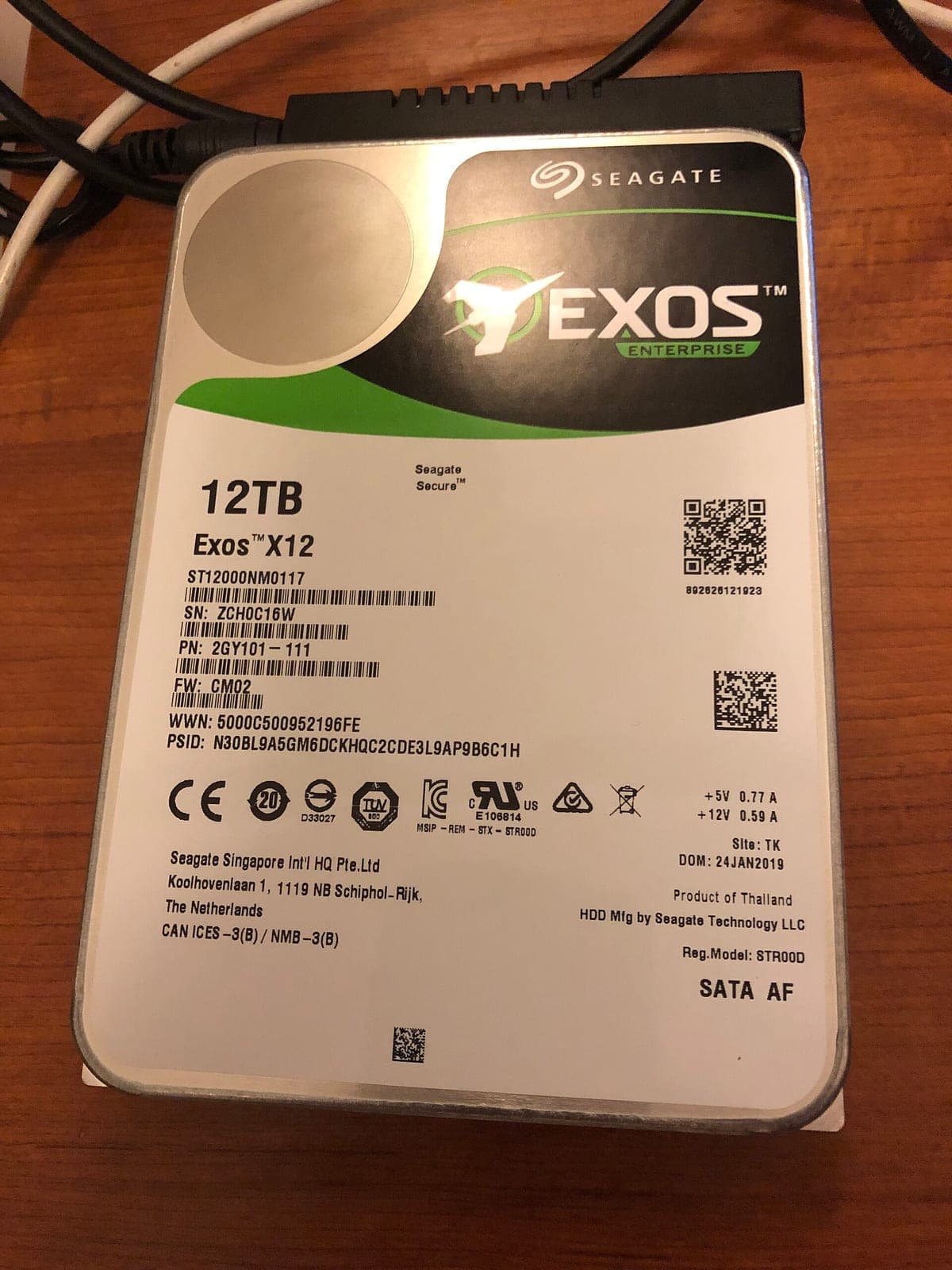
David290, CC BY-SA 4.0 · Wikimedia Commons
Contents8 sections
Key points
- Exos X drives are 3.5-inch, helium-filled and spin at 7,200 rpm. The number in the name is the largest capacity in the series.
- SAS Exos drives need a SAS controller or HBA. For a NAS with SATA ports, buy the SATA version.
- Exos, WD Ultrastar DC HC5xx and Toshiba MG are on a par for workload rating and MTBF. On used drives, condition matters more than brand.
- Huge raw values for Raw_Read_Error_Rate and Seek_Error_Rate are normal on Seagate. Reallocated and pending sectors are what count.
- The FARM log records power-on hours independently of SMART and exposes reset values.
Seagate Exos is Seagate's data-centre hard drive range. Used or recertified, the Exos X16 and X18 are popular for NAS boxes, servers and homelabs: big capacity, built for 24/7 use and far cheaper than new. This guide covers ranges and variants, the comparison with WD Ultrastar and Toshiba MG, and reading SMART data.
The Exos X range: X16, X18, X20 and X24
The X models are 3.5-inch, helium-filled drives spinning at 7,200 rpm. Helium means less drag than air, so more platters fit and the drive draws less power. The number in the name is the largest capacity in the series; smaller ones usually exist too.
| Series | Largest capacity | Interfaces | Used market |
|---|---|---|---|
| Exos X12 / X14 | 12 / 14 TB | SATA, SAS | older generation, widely available |
| Exos X16 | 16 TB | SATA, SAS | widely available |
| Exos X18 | 18 TB | SATA, SAS | common used and recertified |
| Exos X20 / X22 | 20 / 22 TB | SATA, SAS | increasingly available |
| Exos X24 | 24 TB | SATA, SAS | still rare |
Mainstream Exos X models use conventional recording (CMR) and suit RAID and ZFS. Host-managed SMR drives for large customers and the dual-actuator 2X14 and 2X18 (MACH.2) are special cases that don't behave as usual in every system.
Seagate typically quotes 550 TB per year of workload (reads and writes) and an MTBF of 2.5 million hours for Exos X drives. MTBF is a population statistic, not the lifespan of one drive; the model's data sheet is what counts.
Reading the part number
Seagate part numbers start with ST, followed by the capacity in gigabytes and NM for the enterprise range: ST16000NM… means 16 TB. The suffix distinguishes SATA, SAS, sector format and self-encrypting variants; check the label or data sheet. Dell, HPE and Lenovo drives carry their own part numbers and OEM firmware.
SATA or SAS, 512e or 4Kn
Almost every Exos series comes in SATA (6 Gb/s) and SAS (12 Gb/s) versions with identical mechanics; a single hard drive saturates neither. SAS adds two ports and more robust error handling but needs a SAS controller or HBA, and won't even plug into a motherboard SATA port. For a NAS with SATA ports, choose SATA; a server with a SAS backplane runs both.
More in our guides SAS vs SATA vs NVMe and HBA in IT mode for TrueNAS and ZFS, which also covers cabling.
Sector format: 512e and 4Kn
Internally these drives use 4,096-byte sectors. A 512e (emulated) drive reports 512 bytes and translates internally, which works everywhere. A 4Kn (native) drive reports 4,096 bytes; current Linux, Windows and ZFS handle that, older RAID controllers and legacy BIOS boot don't always. Don't mix formats in a hardware RAID array.
On many newer Exos models the format can be switched with Seagate's SeaChest utilities, which erases all data. For ZFS it hardly matters: with ashift=12 the pool writes 4 KiB blocks anyway. SAS drives from storage arrays sometimes have 520-byte sectors and must first be reformatted with sg_format (sg3_utils).
Exos, WD Ultrastar or Toshiba MG?
The three makers' enterprise ranges are very similar: 3.5-inch, helium, 7,200 rpm, CMR, SATA and SAS, 512e and 4Kn, with matching workload and MTBF ratings.
| Range | Examples | Notable |
|---|---|---|
| Seagate Exos X | X16, X18, X20, X24 | FARM log with its own hour counter, SeaChest utilities |
| WD Ultrastar DC HC5xx | HC530 (14 TB), HC550 (up to 18 TB), HC560 (20 TB) | originally HGST; helium level as SMART attribute 22 |
| Toshiba MG | MG08, MG09, MG10 | wide choice of capacities, SATA and SAS |
Used, the individual drive's condition matters more than the brand, and all three are clearly audible under load. Mixing batches or makers in a pool even helps, so the drives don't age in lockstep.
Recertified, refurbished or used?
- Recertified: the manufacturer or an authorised partner has tested, wiped and relabelled the drive. The warranty is usually shorter than new; check who provides it.
- Refurbished: a dealer has checked and tested the pulled drive. How thoroughly depends on the dealer, so ask what was tested.
- Used: pulled, possibly untested. Checking it is up to you.
None of these terms is protected; see refurbished: meaning and differences. What matters is SMART data, warranty and origin. Our used server hard drives are checked and tested before they ship from Germany, with up to 36 months' warranty.
Reading SMART data on a used Exos
Read the values before installing the drive: on Linux with smartctl -x /dev/sdX (smartmontools), on Windows with CrystalDiskInfo or similar. Behind a RAID controller smartctl needs options such as -d megaraid,N.
| Attribute (SATA) | Meaning | Assessment |
|---|---|---|
| 9 Power_On_Hours | power-on hours | 8,760 hours = one year of 24/7 use; not a reason to reject alone |
| 5 Reallocated_Sector_Ct | reallocated sectors | 0 is ideal. A few that don't increase are acceptable. |
| 197 Current_Pending_Sector | pending, unreadable sectors | should be 0 |
| 198 Offline_Uncorrectable | uncorrectable sectors | should be 0 |
| 187 Reported_Uncorrect | reported read errors | should be 0 |
| 199 UDMA_CRC_Error_Count | transfer errors | points to cable or backplane |
| 1 and 7 (read/seek error rate) | encoded counters | high raw values are normal, see below |
Seagate's huge raw values
Raw values in the millions for Raw_Read_Error_Rate or Seek_Error_Rate are normal on Seagate. The 48-bit raw value packs two numbers: the upper 16 bits count errors, the lower 32 bits operations, so a large number mainly means lots of reads or seeks. Recent smartctl versions show both parts separately for many Exos models. What counts is the normalised value (VALUE) against the threshold (THRESH).
FARM: cross-checking power-on hours
Newer Seagate drives also keep the FARM log (Field Accessible Reliability Metrics) with its own hour counter, readable from smartmontools 7.4 with smartctl -l farm /dev/sdX. If its hours differ markedly from Power_On_Hours, SMART has been reset – used drives with wiped SMART data have been sold as new.
SAS Exos: different output
SAS drives have no ATA attributes. smartctl shows the reallocated sector list (Elements in grown defect list), an error counter log with Total uncorrected errors for read, write and verify, and Accumulated power on time. Few or no grown defects and no uncorrected errors are a good sign.
Record the values
Read and save SMART data and the FARM log.Short test
smartctl -t short runs a few minutes.Long test
smartctl -t long reads the entire surface. On 16 or 18 TB this takes about a day.Compare
Read the values again. If reallocated or pending sectors rise, send the drive back.
Exos in a home NAS: power, noise and pin 3
Power Disable: the 3.3 V pin
Some enterprise SATA drives, including certain Exos and Ultrastar models, support SATA 3.3 Power Disable: with 3.3 V on pin 3 of the power connector, the drive stays off. Some power supplies and case backplanes do this permanently, and the drive appears dead. A Molex-to-SATA power adapter or a power cable without the 3.3 V wire fixes it. Server backplanes are normally designed for this.
Noise, power and heat
Exos drives are built for data centres: head movements are clearly audible, and several drives cause noticeable vibration. Decoupled mounts and a damped case help; a utility room is better still. Helium models draw roughly 5–6 W idle and around 10 W under load. Spin-up briefly draws much more on the 12 V rail, so with many drives staggered spin-up helps. Keep drives below about 45 °C.
LFF caddies and NAS compatibility
In servers, 3.5-inch drives sit in LFF caddies that differ by vendor and server generation, so check whether the caddy is included. Some NAS makers warn about drives not on their compatibility list; check your unit.
RAID and ZFS with large Exos drives
With 16 or 18 TB per drive, rebuilds are slow: writing an 18 TB drive at an average 200 MB/s takes 25 hours, and the rest of the array must hold out meanwhile. So use RAID 6, RAIDZ2 or mirrors rather than RAID 5 or RAIDZ1. The maths is in our guide RAID 10, RAID 5 or RAID 6.
Frequently asked questions
Short answers to the questions we hear most often on this topic.
What is the difference between the Exos X16 and X18?
The X18 is the next generation, with up to 18 TB instead of 16 TB. Form factor, spindle speed, helium and interfaces are the same; used, capacity and condition decide.
What does recertified mean for Seagate Exos?
After service or return, the manufacturer or an authorised partner tested, wiped and relabelled the drive. The warranty is usually shorter than on new drives.
Why does my Exos show millions for Raw_Read_Error_Rate?
Seagate stores errors and the number of operations together in this raw value, so a large number is normal. What matters is that the normalised value is well above the threshold.
Exos or WD Ultrastar: which is better?
Technically they are equivalent: helium, 7,200 rpm, similar workload ratings. On used drives, SMART data, warranty and origin matter more than the brand.
Why won't my Exos spin up in my NAS?
Often it's the Power Disable feature: if the power supply puts 3.3 V on pin 3 of the SATA power plug, the drive stays off. A Molex-to-SATA power adapter usually solves it.
Keep reading
ECC RAM explained: UDIMM, RDIMM, LRDIMM and channels
Error correction, module types, ranks and memory channels: what to know before you buy or upgrade server memory.
Read more
Dell R730 memory upgrade: RAM for R630 and DL380 Gen9
Which DDR4 modules fit Dell PowerEdge 13G and HPE ProLiant Gen9, how to populate the 24 slots properly and how to check the result in iDRAC or iLO.
Read more
Dell R740 memory & HPE DL380 Gen10 RAM: slots and speed
Six channels per CPU, 24 slots and a speed that depends on the CPU: how to populate Dell PowerEdge 14G and HPE ProLiant Gen10 servers properly.
Read more